 Home
Home

 Magic the Gathering Decks

22-Sep-2026 15:46
(Last edited: 22-Sep-2026 15:48)
1
Wanted to share my experience using TCGTracking.com for my Deckbox trades with the hope that maybe others will find some benefit from this free service. Disclaimer that I am not affiliated with TCGTracking in any capacity, and I received no compensation of any form for this post.
Why Do I Use TCGTracking?
TCGTracking lets me prove that I shipped something to the recipient. In some circumstances, it also lets me add very affordable insurance to PWE mailings.
What is TCGTracking?
TCGTracking.com is a free service that makes USPS's Informed Visibility available to its users. Informed Visibility adds a tracking strip to your PWE that supports limited scanning and tracking as the envelope moves through the USPS framework.
Below is an example of an Informed Visibility tracking code:

How I Have Used It
When I make a trade here on Deckbox, I follow these steps:
1. Use the 'Quick Create' capability to create a 'Single Order'
2. Paste the recipient's mailing address into the system and let it parse the address into appropriate fields
3. Add the value of the order, which will enable a packing slip later in the process
4. Optional: Add shipping insurance (see below for more details)
5. Print the packing slip, which has the mailing address with the Informed Visibility code on top of it
6. Load the cards and packing slip into a windowed envelope
7. Copy the TCGTracking tracking URL, paste it into the new tracking field in Deckbox, and mark it as shipped
I am far from a power user of the service. I do not use any of its various platform integrations or business-scale features, and there are probably other, casual ways to use the service. For example, there is probably a path to printing directly to an envelope to avoid the packing slip and window envelope process mentioned above.
Shipping Insurance
TCGTracking offers very affordable insurance at a rate of 0.70% of value (as listed in Step 3 above) with a maximum insurable value of $50. The insurance is made available through a partnership with Parcel Insurance Plan (PIP). I have only used it a few times and found it very useful for orders in that awkward $40+ range where it's punitive to pay for other shipping insurance. I have never made a claim through this system and cannot speak to that process.
Using the insurance feature does require that you load $25 into an account on TCGTracking, so this will only be useful for repeat users who plan to spend all of that money.
How It Looks In Practice
This is an example of a shipment that went from my place in North Carolina to a recipient in San Diego (no PII exposed).
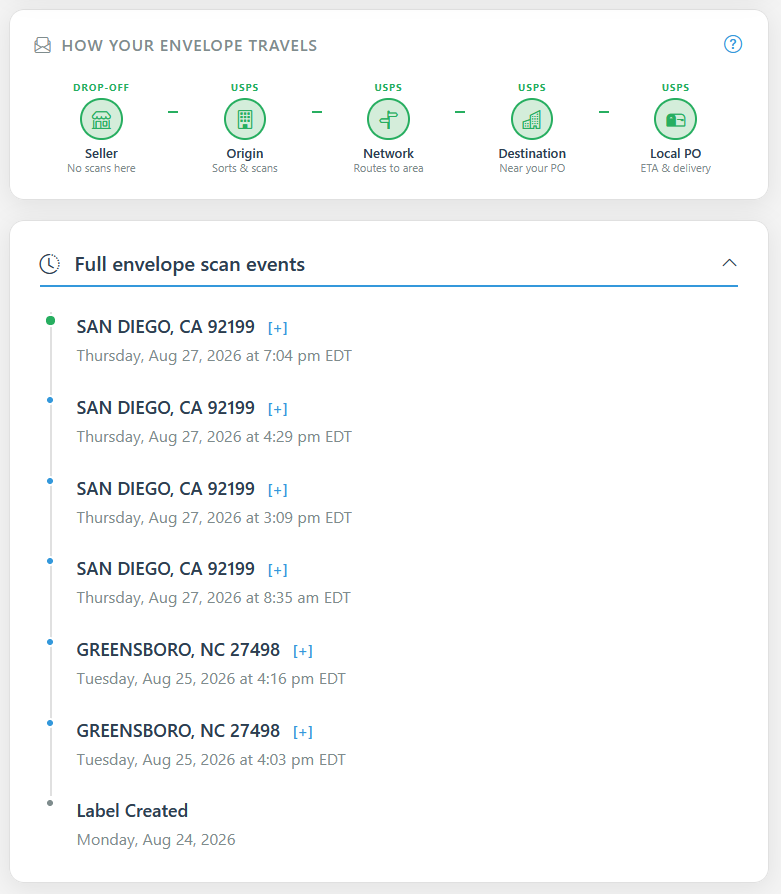
As you can see, it does not offer hyper-granular tracking, but it is enough to help prove that something was shipped and it is moving through the system. Important note: There is no delivery confirmation. Delivery is assumed by the system once the PWE reaches an endpoint in the process.
Why Do I Use TCGTracking?
TCGTracking lets me prove that I shipped something to the recipient. In some circumstances, it also lets me add very affordable insurance to PWE mailings.
What is TCGTracking?
TCGTracking.com is a free service that makes USPS's Informed Visibility available to its users. Informed Visibility adds a tracking strip to your PWE that supports limited scanning and tracking as the envelope moves through the USPS framework.
Below is an example of an Informed Visibility tracking code:
How I Have Used It
When I make a trade here on Deckbox, I follow these steps:
1. Use the 'Quick Create' capability to create a 'Single Order'
2. Paste the recipient's mailing address into the system and let it parse the address into appropriate fields
3. Add the value of the order, which will enable a packing slip later in the process
4. Optional: Add shipping insurance (see below for more details)
5. Print the packing slip, which has the mailing address with the Informed Visibility code on top of it
6. Load the cards and packing slip into a windowed envelope
7. Copy the TCGTracking tracking URL, paste it into the new tracking field in Deckbox, and mark it as shipped
I am far from a power user of the service. I do not use any of its various platform integrations or business-scale features, and there are probably other, casual ways to use the service. For example, there is probably a path to printing directly to an envelope to avoid the packing slip and window envelope process mentioned above.
Shipping Insurance
TCGTracking offers very affordable insurance at a rate of 0.70% of value (as listed in Step 3 above) with a maximum insurable value of $50. The insurance is made available through a partnership with Parcel Insurance Plan (PIP). I have only used it a few times and found it very useful for orders in that awkward $40+ range where it's punitive to pay for other shipping insurance. I have never made a claim through this system and cannot speak to that process.
Using the insurance feature does require that you load $25 into an account on TCGTracking, so this will only be useful for repeat users who plan to spend all of that money.
How It Looks In Practice
This is an example of a shipment that went from my place in North Carolina to a recipient in San Diego (no PII exposed).
As you can see, it does not offer hyper-granular tracking, but it is enough to help prove that something was shipped and it is moving through the system. Important note: There is no delivery confirmation. Delivery is assumed by the system once the PWE reaches an endpoint in the process.
