The Hobbit
released on August 14, 2026!

Order now on CardKingdom Order now on TcgPlayer

The Hobbit
released on August 14, 2026!

Order now on CardKingdom Order now on TcgPlayer
36 total results       Previous Page 2 of 2
You must login or register to post a new reply
Posts [ 31 to 36 of 36 ]
Trade score 0 (100%)
Members
Registered: 22-Nov-2023 04:03
Like some of the other people commenting here, I am used to using other card scanning apps when i index all my bulk. Always after i've entered my keeper cards in Deckbox. The scanner has worked great for me but it's way too slow to add cards at scale compared to what I am used to.

I need the ability to scan a card, scan a card, scan a card... and so on and then look at the 50 or so cards I scanned and at the push of a button add all of them to my collection.

I also would really like some on screen indicator as I scan telling me i have that card in my collection. As it is now this is a tool i would use when shopping for cards and not something I would use to catalog 100s at a time. It's not as fast as manually entering.

I like how manabox pings sounds for card value. I would love a similar feature for card count. Like a Ding for scan complete and a dong if it's already in my collection. I don't know the optimal experience. My workflow is that i get home with 50 or so cards and I only want to keep ones i don't already have OR cards that are valuable. I need my scanner to help me sort out the junk.

Still amazed by the app and I will 100% use. Just not for all situations.
Trade score 13 (100%)
Administrators
Registered: 18-May-2009 18:29
PaulTheLibrarian wrote:
1. On my Android Pixel phone, due to visual impairment, I have my font sizes increased and bolded. With the app, it doesn't seem to handle this very well, and some of the elements are off-screen for me.


I released a new version, should be up later today, with some fixes. It still does not look great but at least all of the controls are visible somehow and clickable, even if some pages need to be scrolled.
Trade score 0 (100%)
Members
Registered: 03-Aug-2019 18:07
Is there something account specific that needs activated on the back end to enable sign in with my account creds (not via Google or Apple SSO)?

Currently using the same credentials I use to sign into the site here, the mobile app is stating invalid credentials.

Very eager to try it out
Trade score 187 (100%)
Members
Registered: 08-Feb-2012 16:30
sebi wrote:
PaulTheLibrarian wrote:
1. On my Android Pixel phone, due to visual impairment, I have my font sizes increased and bolded. With the app, it doesn't seem to handle this very well, and some of the elements are off-screen for me.


I released a new version, should be up later today, with some fixes. It still does not look great but at least all of the controls are visible somehow and clickable, even if some pages need to be scrolled.


I will keep an eye out for the update. I am not sure how to check for updates or confirm which version/build I am using within the app. Those might be additional features worth adding.

Also, I just sent you screenshots from my phone, taken while using the app between 5- 7 PM EST on 2026-08-27.

Cheers, Paul
Trade score 13 (100%)
Administrators
Registered: 18-May-2009 18:29
unitqm wrote:
I need the ability to scan a card, scan a card, scan a card... and so on and then look at the 50 or so cards I scanned and at the push of a button add all of them to my collection.


I do want to provide a "continuous scan" mode. I was just not confident enough on the scanner accuracy so early in the beta, so I thought it's safer now in the beginning to require a button press confirmation after detection, so the user has time to review the scan, and possibly change misdetected foil/language/printing.

It's on my todo list, but I need to be sure it's accurate enough on all detected fields. Because reviewing the 50 auto scanned cards is more difficult if you need to remember that the 4th one was foil and not normal, and the 10th one was french, etc, right? Because after the 50 scans you are not looking at the phisical cards anymore, they're in a stack on the table again, right?
Trade score 187 (100%)
Members
Registered: 08-Feb-2012 16:30
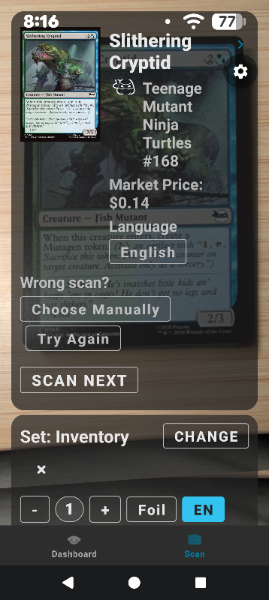
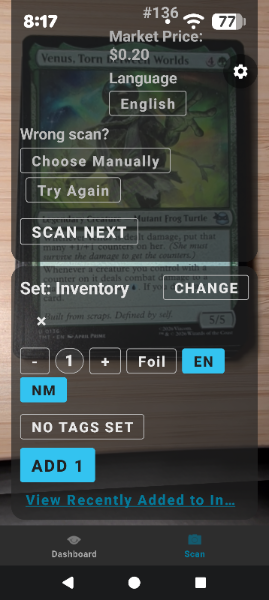
Sebi, the recent build made a big difference on my Pixel phone. Fonts render much better, nothing is cut off, and not having to click a second button to add the card to my list/inventory makes it so much faster!

Thank you so much for your work on this app!

Cheers, Paul

Attachment: deckbox-app-001-2026-08-29.png Size: 175 KB

Attachment: deckbox-app-002-2026-08-29.png Size: 164 KB

Posts [ 31 to 36 of 36 ]
36 total results       Previous Page 2 of 2
You must login or register to post a new reply